I would have never in a million years guessed that I would be playing Minecraft, a game with sub par graphics, no story, no set goal, no anything. But... hidden in this open sandbox game, I found so much stuff to do. I built a farm, a house, tools, and my most favorite accomplishment was learning to program in a programming language called Lua that I've neither heard of or used. I learned Lua just so that I could program a felling turtle to fell a tree and automate a lot of my labor. For the $27 dollars that I paid for this game, I honestly believe that it was well worth it and would definitely recommend to others. Now I don't want this post to sound like review or a paid advertisement, but I truly feel this game deserves some cool points because of how fun it has been especially when you play with friends on a private server.
If your interested in felling a tree with a turtle here's the code I made to do just that. It took a few hours to code because the built-in interpreter does not help very much with finding bugs, but it was definitely fun and rewarding! Side note, sometimes it'll miss some wood(slight bug to be fixed) and its not an entirely 100% efficient algorithm but it works and it does its job, so im not complaining lol. If you need to fell a tree, starting from the bottom here's the code.
You can also download it straight into the turtle through craft OS using pastebin. Here's the pastebin link. http://pastebin.com/gsW50T6g
or you can skim through it here.
Friday, September 4, 2015

Friday, August 28, 2015
My webpage - Styling is a pain
I had to learn the hard way. When I first started with my webpage, I just threw every technique I learned from HTML and CSS into the page without thinking about layout. That was a bad idea, but it turned out to be a great lesson, firstly I allowed my creativity to run free in designing the page, but I failed miserably in making something interesting because I dont't have have the tools yet to make an awesome page. However, with a few hours here and there, and googling around I slowly improved the layout and style of the page. I'm definitely getting more comfortable with HTML and CSS. I can say I don't feel like a complete noob now but there's still plenty to learn and things I want to add to the page. Of course that will happen over time for now its safe time now to start learning Javascript.
In the meantime, if you haven't seen the webpage yet, be sure to head over and check it out. Its constantly changing. I think I should take screenshots of it every now and lol. My website
In the meantime, if you haven't seen the webpage yet, be sure to head over and check it out. Its constantly changing. I think I should take screenshots of it every now and lol. My website
Tuesday, August 18, 2015
Testing out raspberry pi with temperature sensor
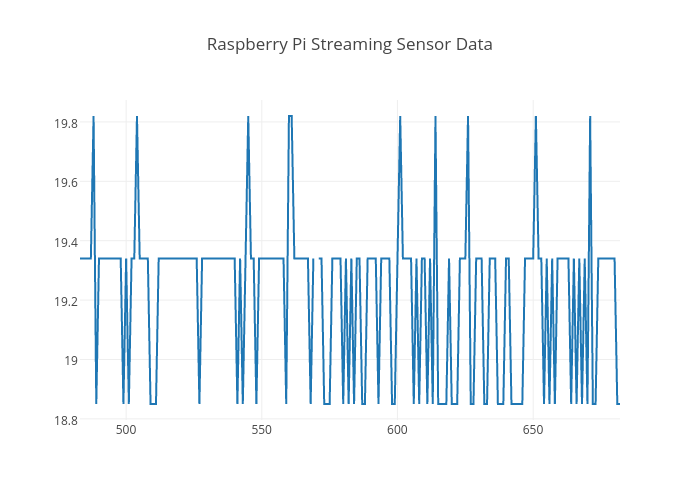
So my role in the senior design project is to have an Arduino measure power from a home distribution panel and send the data to a raspberry pi to relay to a website and if time permits, also to a dedicated mobile app. Note: I do realize that I can skip the RaspPi, and accomplish all of this with only the Arduino, but I decided to go with the raspberry pi since I don't have the Ethernet shield for the Arduino but I do have a RaspPi that is lying around. Therefore, as a test run, since I don't have the materials/equipment to measure power nor do I have access to my home panel at this moment, I decided to improvise by measuring temperature in my room using an Arduino. With this setup, I can setup a mock system that will essentially do all the tasks that the power measuring system would need to do. So with the arduino measuring temperature, I can send the data over to a raspberry pi and finally have the RaspPi send that data over to a web server where I can plot the data on a website.

With a bit of research, I found my way of accomplishing this. Using a TMP36 - Analog Temperature sensor which i have available in my room, I set up a basic circuit seen above:
With a bit of research, I found my way of accomplishing this. Using a TMP36 - Analog Temperature sensor which i have available in my room, I set up a basic circuit seen above:
Then using code seen below from ardx.org. I got my circuit running. From here, I connected my raspberry pi through usb to the arduino. Using putty, to connect via SSH, I setup Raspberry to listen for data by opening up a terminal window, and typing:
pi@raspberrypi ~ $ python
>>> import serial
>>> ser = serial.Serial('/dev/ttyACM0', 9600)
>>> while 1:
... ser.readline()
...
From there, you should see data listing showing you temperature values. Success! Now we need to use an API to graph the data online. I found plotly to be the easiest to use. I went to plotly. I actually found a nice tutorial by plotly on using the tmp36 sensor. Straight to the point, I signed up, obtained a username,API key, and a token, and some code to send the data over to plotly...
Sunday, August 16, 2015
Started working on my personal school webpage
Hello all,
Its been a while since I've been active on this blog but I'm hoping to start back up again. Fall semester will be my final semester at NJIT and classes start in just a few weeks. So with that in mind, I felt it was time to start building my senior design project. In the spring semester my team and I proposed to build a home power monitoring system that will when built relay hopefully in real time how much power is being used in a home to a website as well, if time permits to an app.
I'm tasked to designing the website and programming the Arduino/RaspPi. To get the ball rolling I needed a website to host the data, and found that my university issues every student their own personal website with 1 gig of space. So instead of buying my own site, I decided to use that. I started messing around with the page for fun, so go check it out <---click . I recently learned HTML and CSS, so please don't judge my skills. I'm still a complete noob to web design. If your wondering I took several courses on CodeAcademy which I highly recommend if you want a simple intro to web design. Other then that, the details to the project will probably be posted here as my team and I develop the system. That's it for this post!
Sunday, July 19, 2015
My Favorite Movies of all Time! (in no specific order)
- The Fifth Element
- The Prestige
- Memento
- Fight Club
- Batman Begins
- The Dark Knight/Rises
- Inception
- Shutter Island
- Interstellar
- The Bourne Trilogy
- Shawshank Redemption
- The Matrix Trilogy
- The Silence of the Lambs
- Mad Max: Fury Road
- The Wolf of Wall Street
- Gone Girl
- No Country for Old Men
- Guardians of the Galaxy
- Jurrasic Park (1993)
- Ip Man
- Pirates of the Carribean
- X-Men: Days of the Future Past
- The Lord of the Rings Trilogy
- Leon: The Professional
- Saving Private Ryan
- The Departed
- Gladiator
- Back to the Future: Trilogy
- Kill Bill Vol 1 & 2
- Snatch
- Die Hard series
- Pulp Fiction
- Iron Man (2008)
- Seven
- Casino Royale
- Quantum of Solace
- Skyfall
- Date Night
- Inglorious Basterds
- The Fifth Element
- Mission Impossible I,II,III,IV
- National Treasure I,II
- Blood Diamond
- Catch Me If You Can
- Forrest Gump
- Gangs of New York
- Panic Room
- Edge Of Tomorrow
- Minority Report
- Die Hard Series
- Ocean Eleven/Twelve
- Rounders
- Good Will Hunting
- Enemy at the Gates
- Inside Man
- 2 Guns
- Street Kings
- The Book of Eli
...List to be continued...
Thursday, August 14, 2014
Hello my name is Aaniyah I'm a student at NJIT and this is the last day of camp. MY experience was fun, we went on trips such as the MoMA in New York we went to Camp Berine the Newark MUSEUM. Also we had a lot of events like the ice-cream social, Career Day where we went to different classes and people was talking about what they do for a living like doctor , nurse social network etc. this program help me find myself discover new friends for example erica kailyn and louana so so far i like this camp this is my 3 year here and its been good. MY old teacher Mr. A taught me some math and i learned a lot from him and this is how my summer went byeee
Tuesday, August 5, 2014
Hello all,
In my previous post, I explained why I started a blog and what my plans were. Today I'm just gonna share some cool things I've learned.
In my previous post, I explained why I started a blog and what my plans were. Today I'm just gonna share some cool things I've learned.
- Learned a new programming language: Python! - Below is summary of what I've touched on:
- print("Hello, World!")
- 'def' functions
- if/else statements
- for and while loops
- slicing/indexing strings
- Played around with Python turtles ;)
- and still learning
- Started reading the famous SICP(Structure and Interpretation of Computer Programs) and learned a little of Scheme a dialect of the second oldest(first is Fortran) programming language called Lisp!
- Installed the MIT/GNU Scheme interpreter and played around with Scheme by running some basic commands such as
(define (square x) (* x x))
(square 4)
(+ (square (+ 2 3)) (square 4) (- 4 3))- While learning Scheme, I played around the well known emacs text editor
- Also I'd like to mention that much more comfortable I am working in the terminal.
My sources used for learning the above topics:
- Udacity's free online course - "Intro to Computer Science" (I am currently on unit 3 out of 7)
- I also use the online book "How to think like a Computer Scientist as a reference while learning Python
- On the side, I've been following UC Berkeley's CS61a course using Python while reading SICP
- And on that note, I added SICP(google for free online pdf) to my current reading while continuing with my reading of my other texts listed in my last post(I tend to jump around my reading list depending on my interests that day)
- If your wondering, I learned to use the terminal through googling. I mostly use the terminal to compile and run my code. Each time adding and using a new command to my belt of tools such as: "ls, pwd, cd, .., mkdir, rm, etc".
Subscribe to:
Posts (Atom)